Control · Integrations
Choose how each connection works
Set up how your application sends information to a service and handles the reply. The settings below cover who can connect, which data is exchanged, what happens when something goes wrong and who approves changes.
Configure security, field matching, testing and recovery in one place. Use mocks to simulate replies, a sandbox for testing and production for real work.
Start with provider information
Files and samples
Start with whatever the provider supplies: documents, an Excel field list, text or sample data. The engine also accepts technical API descriptions and request files, including OpenAPI 2/3, Postman collections with their environment settings, cURL and WSDL, plus JSON or XML samples.
API styles
REST, SOAP and GraphQL are different ways that systems exchange requests and replies. Choose the style used by your provider. REST connections can send JSON or XML data, form values or multipart requests that combine fields and files.
Guided set-up and AI
Evidence and questions
The Gap Report shows what is known and what still needs checking. Guided questions help fill those gaps. The Assumption Ledger is a record of defaults and interpreted answers, with a reason, risk and checking plan for each one.
Reviewable proposals
See the current settings beside the proposed changes before accepting them. Each accepted proposal is applied as one step that you can undo. This lets your team check the effect of a change without losing track of what was there before.
Security and sign-in
Keys and tokens
These settings control how the connection proves it has permission to use the service. Supported methods include an API key, Basic authentication, a bearer token, OAuth 2.0 client credentials, password and refresh-token flows, or a token obtained from another call. Your technical colleague can select the method required by the provider.
Signing and certificates
Some providers require a signed token or request, using JWT or HMAC, or a client certificate through mutual TLS. These mechanisms help the provider verify the sender. Temporary access tokens are stored for reuse and renewed once when several requests need a refresh at the same time.
Data, mapping and checks
Field glossary
Describe what each field means, the kind of value it holds and the format the provider expects. Add an example and classify its sensitivity as Public, Internal, Personal or Secret. This helps business and technical colleagues understand the same data.
Mapping and validation
Mapping matches your form fields to the provider fields. Transformations adjust values along the way, such as changing a date format, joining text or handling a list. Validation checks required values, formats, ranges and conditions before sending the request, so invalid input does not cause an unnecessary call.
Errors and outcomes
Shared outcome rules
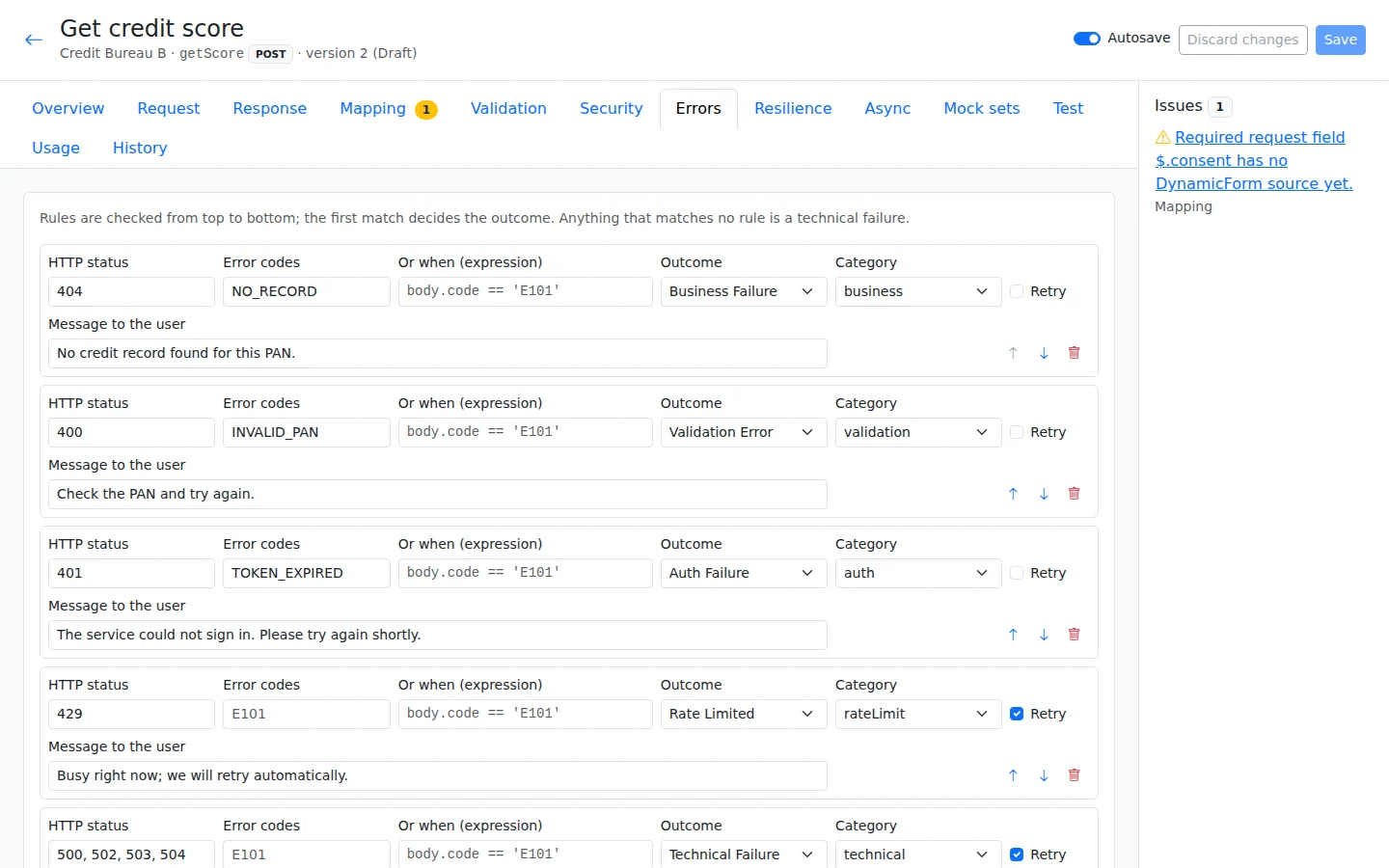
Providers use different codes to describe success and failure. The error matrix translates those codes into 11 standard outcomes and messages your users can understand. Screens, workflows and the phone app can then respond consistently to the same kind of result.
Handling delays and failures
Limits and recovery
Set a timeout to limit how long a call can wait, and rate limits to control how frequently requests are sent. Retries can wait progressively longer between attempts, while a circuit breaker stops calls to a failing provider. Calls that change data are retried only when the provider can prevent duplicate changes through idempotency.
Delayed results
Callbacks and polling
A callback lets the provider send a result when it is ready. The receiver checks a signature, token or permitted network address and processes repeated callbacks only once. If a callback is not available, polling checks for the result within a time limit; the completed result updates the open screen.
Mocks and testing
Reusable test cases
Prepare up to 10 example request-and-reply pairs for each API, covering different results. Import saved Postman examples or capture sandbox replies with personal data hidden. The coverage strip shows results that have not been tested. Save individual runs as test cases and run the set together as a test suite when you need to check a change.
Several providers and flows
Routes and chains
Choose which provider should answer a request and when to switch to a backup or return to the original provider. For a multi-step process, join calls into a flow with decisions, parallel work, waits and actions that undo earlier work when needed.
Where a service is used
Screens and workflows
Use a connection to fill a dropdown, look up information, respond to a button or read an uploaded document. It can also run when a screen opens, during a one-time-password (OTP) step, before saving or as a workflow moves between steps.
Safe by design
Server and vault
Calls run on the server, where passwords and keys are kept in a protected vault. Personal data is hidden in logs and each customer’s data stays separate. The engine also restricts internal network destinations, uses TLS 1.2 or higher to protect connections, limits response sizes and reads XML safely.
Versions, permissions and approvals
Versions and approvals
Keep earlier versions and compare what changed. Provider versions need approval before moving to Production, and all reverts use approval. Flow publishing and saves to logical operations or provider groups are direct actions for authorised users in this release. Separate permissions control viewing, editing, publishing, credential management and operations.
Move between environments
Move integrations, flows and mock scenarios between test and live environments without copying credentials. For older registrations, first preview the conversion with a dry run and compare old and new results side by side. The conversion can be reversed.
The 11 standard outcomes
Success
The call completed successfully and returned its result. Choose which fields to fill or which workflow step should follow.
Business failure
The service replied, but the result did not meet its business rules. Show an appropriate message or take the alternative path your team configured.
Validation error
The request contains missing or invalid information. Use this result to help the user correct the relevant values.
Auth failure
The connection could not sign in or obtain the required access. This is an authentication problem for your team to investigate.
Rate limited
Requests have reached the allowed call rate. Use the configured waiting or retry behaviour instead of continuing to send requests immediately.
Timeout
The service did not reply within the time allowed. Decide whether the user should retry, wait or follow another configured path.
Technical failure
A technical problem prevented the call from completing normally. A friendly message can guide the user while operations investigates the cause.
Invalid response
The reply could not be used in the expected form. Your team can inspect the masked trace to understand what the provider returned.
Partial response
The service returned only part of the expected result. Choose how the screen or workflow should handle the missing information.
Result pending
The provider has not finished and a result is expected later. Your process can wait for a callback or check again using polling.
Provider unavailable
The provider could not be used for the request. Your configured rules determine whether to use a backup or show another next step.
Example · Customer Loan Origination
The loan example connects OTP, identity reading, pincode lookup, dedupe, credit bureau, statement analysis, scoring, bank-account check, payment and loan-system hand-off. The guided engine sets them up with invented data, tests against mocks and requires approval before production.
Build your first app free
All platform features, hosted by us for 120 days. For testing and evaluation, subject to our Fair Use Policy.
Explore DynamicForm
Updated 16 November 2026