Control · Integrations
One service. Several providers. Connected calls.
Your application can use one business service even when several providers can supply it. Choose how requests are shared between providers, or connect several service calls when the result of one determines what should happen next.
Set rules for choosing a provider or connecting several calls. Your screens receive consistent results, and your team tests each path before publishing.
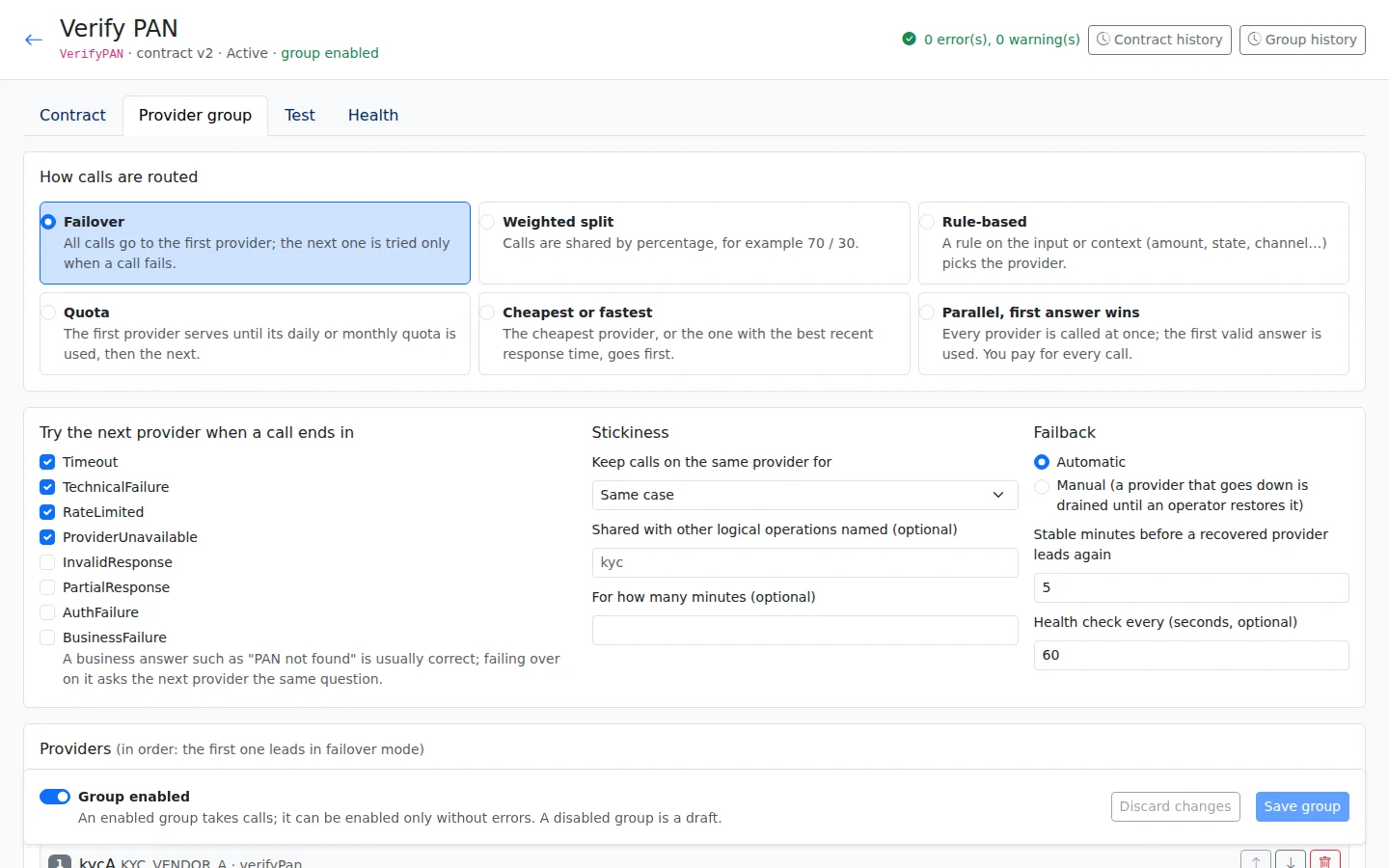
Choose a routing mode
| Mode | When to use it | Example |
|---|---|---|
| Failover | Keep working when the preferred provider is unavailable. The rules choose an eligible backup. | If Provider A cannot answer, send the request to Provider B. |
| Weighted split | Share requests between providers using proportions your team sets. This controls how much work each receives. | Allocate one configured share to Provider A and the rest to Provider B. |
| Rules | Choose a provider using information about the request. Rules can use channel, product, amount or time. | Send requests from one channel to Provider A and requests from another to Provider B. |
| Quota | Keep provider use within a daily or monthly allowance. The routing settings take these limits into account. | Choose a provider according to the daily quota set for the service. |
| Cost or latency | Choose by the configured cost or response time. Latency means how long a provider takes to respond. | Select the eligible provider with the lowest cost or quickest reply. |
| First answer | Ask providers at the same time and use the first answer returned. This is one of the routing choices your team can configure. | Send the request to Provider A and Provider B, then take the first answer. |
Switching providers and switching back
A logical operation is the business service your application asks for, independent of which provider supplies it. A provider group contains the providers that can perform that service. Their replies are mapped into the same fields, so your screens and workflows can use the result consistently.
Health tracking shows whether each provider is responding. If the primary provider fails, failover sends requests to a backup according to your rules. Failback means returning to the primary provider when it recovers; this can be automatic or manual. Enable stickiness when one case should stay with the same provider.
Integration Flows
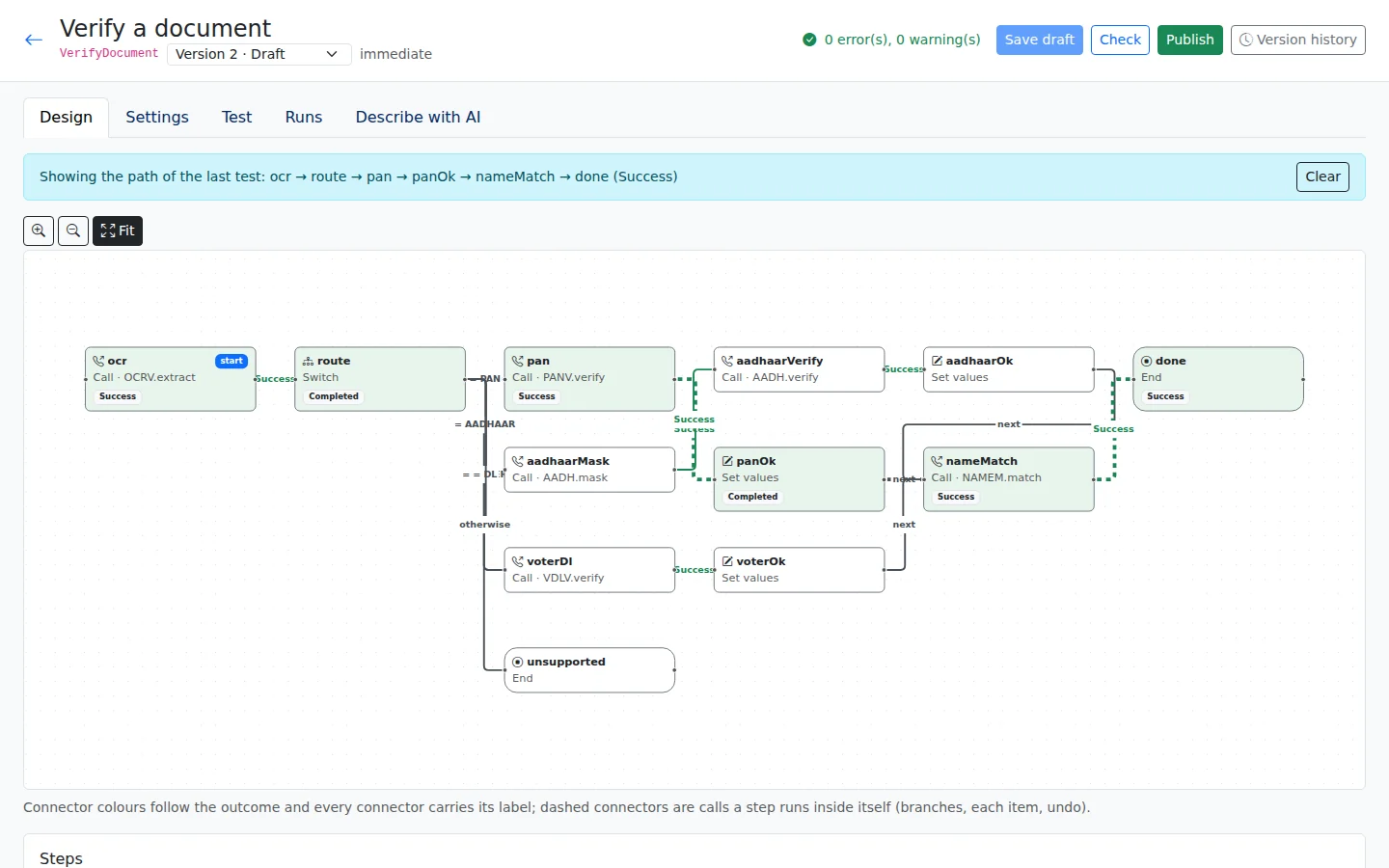
An Integration Flow connects several calls into one process. It can choose a path based on a result, run calls in parallel, repeat a step for each item in a list, wait for a delayed reply or run another saved flow. Compensation steps define actions that undo earlier work when needed.
Describe the process and the AI can draft the flow for review. The checker points out steps that cannot be reached and results that have no next action. The path tester highlights the route taken, helping your team see whether the flow follows the intended process.
Choose how long to wait for a reply and whether to retry after a delay. Increasing the wait between attempts is called back-off. A call that changes data is retried only if the provider supports idempotency: a way to prevent the same request from making the change twice. A circuit breaker temporarily stops calls to a provider that is failing.
Example · Customer Loan Origination
The loan example reads a document type, routes to PAN, Aadhaar or Voter/DL verification, then matches the name and returns one combined result. All demonstration data is invented.
Build your first app free
All platform features, hosted by us for 120 days. For testing and evaluation, subject to our Fair Use Policy.
Updated 30 October 2026